Showing posts with label Java. Show all posts

Wednesday, September 5, 2012

Exception Handling in Java


Whenever we write a code we need to take care of several path of execution but sometimes it's   impossible to take care of all the probabilities,so when the code run through these unhandled paths we may have to face exception in normal execution.
In Java to avoid these kind of scenario we use Exception handling mechanisms.


Suppose method1() calls method2()
               method2() calls method3()
               method3() calls method4()

Here if any error occurs in method4() then an Exception object is created and throws it back to the method which called means here it is method3() then back to method2() and method1().
This Exception objects some information of the error occurred like error code,cause,line number etc
The Object is thrown so that the calling method can get a chance to handle it and keep going with the normal  flow of program execution.
The call stack mechanism of exception handling is a very useful feature in Java.

There are three types of exception

Checked Exception :
 Except the Error and Runtime Exception all exceptions are checked exception. Suppose we write a program to read an image file so the image path is also mentioned in the program.Now if the image doesn't exist on the path we  will get an Exception of java.io.FileNotFoundException.So we have to handle this Exception.The method responsible for reading the image throws an Exception of  java.io.FileNotFoundException while the file doesn't exist .We need to handle all the Exceptions before compilation.If we don't handle this then we get a compilation error for not handling the checked Exceptions.Checked Exception are predictable Exception so it's easy to handle them.

Runtime Exception :
This type of  Exceptions occurs generally because of  error in programming logic.
Suppose you are trying to cast an Non Integer Object into an  Integer here Casting is not possible so you will get an Exception as ClassCastException.
Runtime exceptions are not predictable at the time of compilation.
This exception is considered as unchecked Exception.
Some very common runtime exceptions are ArrayIndexOutOfBoundException, NullPointerException.

Error :
This type of Exception is completely out of scope of the application.A programmer cannot make this type of Exception.Error happens due to some external reason like you are trying to add too many objects in memory but JVM memory MAX limit size is already reached so you will get an error  named  java.lang.OutOfMemoryError.
Common error is  java.lang.NoClassDefFoundError.


Exception Hierarchy


Handling Exception
In Java we used to handle exception using try{} block  which is followed by a catch(){} and/or a finally{} block.
try
{
  // add code here
} catch(exception name)
{

   // handle in catch block
}finally
{

  // handle inside finally
}


 Exception can be handled in catch() block then why do we need the finally block ?
 If any exception occurs then try block is not executed till the end so it goes to the catch block and if no exception occurs then the catch() block is not executed so what will we do if we need to execute for both the situation. Like connection release or file release kind of thing must be executed so we generally put these type of operations in finally  block as finally block should always be executed.

We can put multiple catch block for a single try block as the try block can throw multiple Exceptions so to handle each of the Exceptions we can add different catch block.

Let us discuss about few common Exceptions


java.lang.ArrayIndexOutOfBoundsException :   This Exception is thrown while trying to get the value of index out side the range of   0  to  (length -1)  range.
Example Code :
public void arrayException() {
  int[] intArray = new int[] { 1, 5, 6, 9, 0 };

  System.out.println("size of Array is " + intArray.length);
  System.out.println("1 st element is  " + intArray[0]);
  System.out.println("5 th element is  " + intArray[4]);
  System.out.println("Let us check the 6 th element ?  " + intArray[5]);

 }

Output :
size of Array is 5
1 st element is  1
5 th element is  0
Exception in thread "main" java.lang.ArrayIndexOutOfBoundsException: 5
 at com.fastlearned.ExceptionExample.arrayException(ExceptionExample.java:11)
 at com.fastlearned.ExceptionExample.main(ExceptionExample.java:49)


java.lang.StringIndexOutOfBoundsException : This Exception is thrown while trying to get  the character of a string value of index outside 0 to length()-1 range

Example Code :
public void stringException() {
  String str = "fastLearned";

  System.out.println("size of str is " + str.length());
  System.out.println("13 st element is  " + str.charAt(12));

 }

Output :
size of str is 11
Exception in thread "main" java.lang.StringIndexOutOfBoundsException: String index out of range: 12
 at java.lang.String.charAt(String.java:687)
 at com.fastlearned.ExceptionExample.stringException(ExceptionExample.java:19)
 at com.fastlearned.ExceptionExample.main(ExceptionExample.java:50)


java.lang.NullPointerException : This Exception is thrown while an object in not initialized but we started working on it.

Example Code :
public void nullstringException() {
  String str = null;
  System.out.println("size of str is " + str.length());

 }

Output :
Exception in thread "main" java.lang.NullPointerException
 at com.fastlearned.ExceptionExample.nullstringException(ExceptionExample.java:25)
 at com.fastlearned.ExceptionExample.main(ExceptionExample.java:51)


java.lang.NumberFormatException : This Exception happens when we try to convert wrong  string 
into number like trying to convert a alphabet into a number or a float into a int.

Example Code :
  public void numberFormatTestException()
 {
  int intVal = Integer.valueOf("8.9");
 }

Output :
Exception in thread "main" java.lang.NumberFormatException: For input string: "8.9"
 at java.lang.NumberFormatException.forInputString(NumberFormatException.java:48)
 at java.lang.Integer.parseInt(Integer.java:456)
 at java.lang.Integer.valueOf(Integer.java:553)
 at com.fastlearned.ExceptionExample.numberFormatTestException(ExceptionExample.java:31)
 at com.fastlearned.ExceptionExample.main(ExceptionExample.java:52)


 java.lang.OutOfMemoryError :

This error can be thrown if you run out of memory:
This error is thrown by the JVM when new object can be created in it's memory.

java.lang.StackOverflowError :
Each process is allocated a fixed size stack and a stack is used to store the activation record of each method that is called it contains the parameters and the local variables as well as other information such as the return address. Unbounded recursion can cause the Java Virtual Machine to run out of space in the stack:


Example Code :
  public void methodA()
 {
  methodB();
 }

 private void methodB() {
  methodA();
  
 }
 

java.lang.NoClassDefFoundError : Java Interpreter throws this Error.This is thrown when The Class we are trying to run is not accessible from the working directory.
It can be due to package structure also like while running the Class we forget to mention the package name before the Class .

java.lang.NoSuchMethodError : This Error is thrown at runtime while trying to call a method which doesnot exist.If you don't put a main method and trying to run the class you get this error.If you made a change in the signature of main method then also you will get this Error.

Sunday, August 26, 2012

Java Collection

Collections framework is used in java to store a group of objects.

In Collections framework the most important interface is Collection interface.
Collection interface has some important methods to add,remove,update and search objects.

Collection interface methods are as follows

int size()   : This method is used to check the size of the collection  
boolean isEmpty() : this method is used to check whether the collection contains any object or not
boolean contains(Object obj) :This method is used to search obj object in the collection
boolean containsAll(Collection<?> c) : Returns true if this collection contains all of the elements in the specified collection c.
boolean equals(Object other) : Checks equality with the other object
boolean addAll(Collection<? extends E> from) : Adds all the from collection into this collec
boolean remove(Object obj) : obj Object is removed from the collection
boolean removeAll(Collection<?> c) : Remove all the objects of c collection from this collection if exists.
void clear() : Cleans the collection and empty the collection
boolean retainAll(Collection<?> c) : Retains only the elements in this collection that are contained in the specified collection (optional operation). In other words, removes from this collection all of its elements that are not contained in the specified collection.
Object[] toArray() : This method is used to convert collection into an object array.


List,Set and Queue interfaces extends collection interface.

List : used to store things in ordered form.
Set : used to store unique objects only
Queue : used to store objects as per need basis .

Map is an interface which is used to store objects in key value pair.


hashcode() and equals method in Java
Whenever we create a class in java it automatically extends Object class.
We don't need to explicitly mention this on our own class.We need to override these two methods when we are creating our own class and the instances of that class is going to be added in a collection class.
Object class has 2 important methods hashcode() and equals() which were interlinked too.
A contract between hashcode() and equals is that a given object must consistently report the same hash value and that two objects which equals() says are equal must report the same hash value.

 hashcode() values are used to store an object in collection objects and also it is useful to retrieve an object from collection object. A collection which uses hashing algorithm it uses the hashcode() value to
find the proper bucket and if more than one object exista in that bucket then it checks the equality with the objects using equal function.

 toString()
It's an important method  of Object class. We need to override this method when we need a meaningful output while printing this object by default it returns object hashcode() value as output.


Now let us discuss about the interfaces in details and their concrete implemention.

List : List is used to store elements based on index. Values can be retrieved from a specific index.


Examples : If we are going to implement Bookshelf for storing books in ordered form we can use List.


ArrayList :
                 Implements List interface.
                 It has no size limit like array.
                 Elements are stored in ordered way bot not sorted.
                 It's used for fast retrieval of elements but slow insertion and deletion than linked list

Vector :  It's same as ArrayList .The only difference is its thread safe so in multithreaded environment
               it's better to use.It's a legacy class.

LinkedList : Elements are ordered not sorted.
                   Elements are doubly linked with another.
                   Provides methos to add or remove from head or tail.
                   Fast insertion and deletion but slow retrieval.

CodeExample :

package com.fastlearned;

import java.util.ArrayList;
import java.util.LinkedList;
import java.util.List;
import java.util.Vector;

public class ListExample {

 public void arrayListMethod() {
  // creating an arraylist
  List arrayList = new ArrayList();
  for (int i = 0; i < 5; i++) {
   arrayList.add("Book" + i);
  }

  System.out.println("ARRAYLIST 1st pos " + arrayList.get(0));
  System.out.println("ARRAYLIST 3rd pos " + arrayList.get(2));

 }

 public void vectorMethod() {
  {
   // creating an Vector
   List vectorList = new Vector();
   for (int i = 0; i < 5; i++) {
    vectorList.add("Book" + i);
   }

   System.out.println("VECTOR 1st pos " + vectorList.get(0));
   System.out.println("VECTOR 3rd pos " + vectorList.get(2));

  }
 }

 public void linkedListMethod() {
  {
   // creating an LinkedList
   List linkList = new LinkedList();
   for (int i = 0; i < 5; i++) {
    linkList.add("Book" + i);
   }

   System.out.println("LINKEDLIST 1st pos " + linkList.get(0));
   System.out.println("LINKEDLIST 3rd pos " + linkList.get(2));

  }
 }

 /**
  * @param args
  */
 public static void main(String[] args) {

  ListExample example = new ListExample();
  example.arrayListMethod();
  example.vectorMethod();
  example.linkedListMethod();

 }

}

Output :
ARRAYLIST 1st pos Book0
ARRAYLIST 3rd pos Book2
VECTOR 1st pos Book0
VECTOR 3rd pos Book2
LINKEDLIST 1st pos Book0
LINKEDLIST 3rd pos Book2


Set : Used to store unique elements so no duplicate values are allowed to store in a set.


Example :  We can use set for implementing an aquarium full of fishes with unique color only.
HashSet :
            Elements are stored as unordered and unsorted.
            Elements are stored using hashing algorithm.
            Each object has a hashcode value which is used to used to inserting or
           retrieving an element from a set.

LinkedHashSet :
                            It  maintains insertion order.
                            It's unsorted Set.
                            Maintain doubly linked list across elements.

TreeSet :
                       It is a sorted set.
                       It uses natural ordering or rather say ascending order.
                     

Code Example :
package com.fastlearned;

import java.util.HashSet;
import java.util.Iterator;
import java.util.LinkedHashSet;
import java.util.Set;
import java.util.TreeSet;

public class SetExample {

 public void hashSetMethod() {
  Set<fish> hset = new HashSet<fish>();
  hset.add(new Fish("RED"));
  hset.add(new Fish("YELLOW"));
  hset.add(new Fish("PURPLE"));
  hset.add(new Fish("GREEN"));

  // adding two more fishes of same color
  hset.add(new Fish("RED"));
  hset.add(new Fish("PURPLE"));

  Iterator<fish> fishIterator = hset.iterator();
  while (fishIterator.hasNext()) {
   System.out.println("HashSet = " + fishIterator.next());
  }

 }

 public void linkedHashSetMethod() {
  Set<fish> hset = new LinkedHashSet<fish>();
  hset.add(new Fish("RED"));
  hset.add(new Fish("YELLOW"));
  hset.add(new Fish("PURPLE"));
  hset.add(new Fish("GREEN"));

  // adding two more fishes of same color
  hset.add(new Fish("RED"));
  hset.add(new Fish("PURPLE"));

  Iterator<fish> fishIterator = hset.iterator();
  while (fishIterator.hasNext()) {
   System.out.println("LinkedHashSet() = " + fishIterator.next());
  }

 }

 public void treeSetMethod() {
  Set<fish> hset = new TreeSet<fish>();
  hset.add(new Fish("RED"));
  hset.add(new Fish("YELLOW"));
  hset.add(new Fish("PURPLE"));
  hset.add(new Fish("GREEN"));

  // adding two more fishes of same color
  hset.add(new Fish("RED"));
  hset.add(new Fish("PURPLE"));

  Iterator<fish> fishIterator = hset.iterator();
  while (fishIterator.hasNext()) {
   System.out.println("TreeSet() = " + fishIterator.next());
  }

 }

 /**
  * @param args
  */
 public static void main(String[] args) {

  SetExample setExample = new SetExample();
  setExample.hashSetMethod();
  setExample.linkedHashSetMethod();
  setExample.treeSetMethod();

 }

 class Fish implements Comparable<fish> {
  String color;

  public Fish(String _color) {
   color = _color;

  }

  /*
   * (non-Javadoc)
   * 
   * @see java.lang.Object#hashCode()
   */
  @Override
  public int hashCode() {
   final int prime = 31;
   int result = 1;
   result = prime * result + getOuterType().hashCode();
   result = prime * result + ((color == null) ? 0 : color.hashCode());
   return result;
  }

  /*
   * (non-Javadoc)
   * 
   * @see java.lang.Object#equals(java.lang.Object)
   */
  @Override
  public boolean equals(Object obj) {
   if (this == obj)
    return true;
   if (obj == null)
    return false;
   if (getClass() != obj.getClass())
    return false;
   Fish other = (Fish) obj;
   if (!getOuterType().equals(other.getOuterType()))
    return false;
   if (color == null) {
    if (other.color != null)
     return false;
   } else if (!color.equals(other.color))
    return false;
   return true;
  }

  @Override
  public String toString() {

   return color;
  }

  private SetExample getOuterType() {
   return SetExample.this;
  }

  @Override
  public int compareTo(Fish o) {

   return color.compareTo(o.color);
  }

 }

}
Output :
HashSet = GREEN
HashSet = PURPLE
HashSet = YELLOW
HashSet = RED
LinkedHashSet() = RED
LinkedHashSet() = YELLOW
LinkedHashSet() = PURPLE
LinkedHashSet() = GREEN
TreeSet() = GREEN
TreeSet() = PURPLE
TreeSet() = RED
TreeSet() = YELLOW


Why do we need to implement  Comparable interface ?
When the instance of our own class is used in a Sorted collection we need to implement the interface
Comparable as the method compareTo() of Comparable is used to compare objects for sorting purpose.Example of sorted class Collection  are TreeMap,TreeSet.
We have utility functions of Collection object sorting as Collections.sort(collection)  and Array object sorting as Arrays.sort(arrayObject).We need to implement the Comparable interface if we are using these sorting functions.

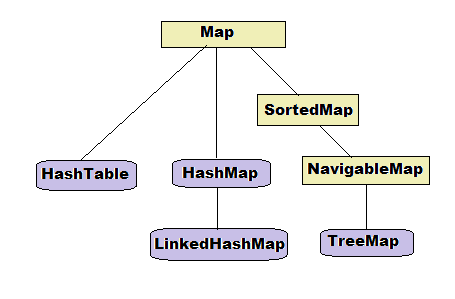
Map :  Map interface is used to store elements in key value pair.


HashMap : HashMap is used to store key,value pair using hashing algorithm.
                   HashMap is an unordered and unsorted Map.
                   Elements hashcode() funtion is used to store and retrieve elements.
                   One null key and multiple null values can be inserted in a HashMap.
                   HashMap is the fastest Map for element adding and removing.
HashTable : It's a legacy class and has the same property as HashMap.
                    Only difference is it's safe to use in multithreaded environment means it's thread-safe.
                     It does not allow null key and null value.

LinkedHashMap : It is an ordered Map as it maintains insertion order while storing elements.
                             Elements can be retrieved as per insertion order.
                            It has faster iteration than other Maps.

TreeMap : It's a sorted Map. Sorting can be made as per need basis by implementing Comparable interface.

Code Example :
package com.fastlearned;

import java.util.HashMap;
import java.util.Hashtable;
import java.util.LinkedHashMap;
import java.util.Map;
import java.util.Map.Entry;
import java.util.TreeMap;

public class MapExample {

 public void hashMapMethod() {
  System.out.println("Inside hashMapMethod()==");
  Map map = new HashMap();
  map.put("k1", new ValueObject("v3"));
  map.put("k2", new ValueObject("v4"));
  map.put("k3", new ValueObject("v6"));

  System.out.println("get the value of k1 = " + map.get("k1"));

  System.out.println("get all the keys " + map.keySet());
  // retrieving all the key and values
  for (Entry keyVal : map.entrySet()) {
   System.out.println(" key = " + keyVal.getKey() + " value = "
     + keyVal.getValue());
  }

 }

 public void hashTableMethod() {
  System.out.println("Inside hashTableMethod()==");
  Map map = new Hashtable();
  map.put("k1", new ValueObject("v3"));
  map.put("k2", new ValueObject("v4"));
  map.put("k3", new ValueObject("v6"));

  System.out.println("get the value of k1 = " + map.get("k1"));

  System.out.println("get all the keys " + map.keySet());
  // retrieving all the key and values
  for (Entry keyVal : map.entrySet()) {
   System.out.println(" key = " + keyVal.getKey() + " value = "
     + keyVal.getValue());
  }

 }

 public void linkedHashMapMethod() {
  System.out.println("Inside linkedHashMapMethod() == ");

  Map map = new LinkedHashMap();
  map.put("k1", new ValueObject("v3"));
  map.put("k2", new ValueObject("v4"));
  map.put("k3", new ValueObject("v6"));

  System.out.println("get the value of k1 = " + map.get("k1"));

  System.out.println("get all the keys " + map.keySet());
  // retrieving all the key and values in ordered form
  for (Entry keyVal : map.entrySet()) {
   System.out.println(" key = " + keyVal.getKey() + " value = "
     + keyVal.getValue());
  }

 }

 public void treeMapMethod() {

  System.out.println("== Inside treeMapMethod() == ");
  Map map = new TreeMap();
  map.put(100, new ValueObject("v3"));
  map.put(20, new ValueObject("v4"));
  map.put(34, new ValueObject("v6"));

  System.out.println("get the value of key 20 = " + map.get(20));

  System.out.println("get all the keys " + map.keySet());
  // retrieving all the key and values in ordered form
  for (Entry keyVal : map.entrySet()) {
   System.out.println(" key = " + keyVal.getKey() + " value = "
     + keyVal.getValue());
  }

 }

 /**
  * @param args
  */
 public static void main(String[] args) {

  MapExample m = new MapExample();
  m.hashMapMethod();
  m.hashTableMethod();
  m.linkedHashMapMethod();
  m.treeMapMethod();

 }

 class ValueObject {
  String value;

  public ValueObject(String val) {
   value = val;

  }

  @Override
  public String toString() {

   return value;
  }

 }
}

Output :
 Inside hashMapMethod()==
get the value of k1 = v3
get all the keys [k3, k1, k2]
 key = k3 value = v6
 key = k1 value = v3
 key = k2 value = v4
Inside hashTableMethod()==
get the value of k1 = v3
get all the keys [k3, k2, k1]
 key = k3 value = v6
 key = k2 value = v4
 key = k1 value = v3
Inside linkedHashMapMethod() == 
get the value of k1 = v3
get all the keys [k1, k2, k3]
 key = k1 value = v3
 key = k2 value = v4
 key = k3 value = v6
== Inside treeMapMethod() == 
get the value of key 20 = v4
get all the keys [20, 34, 100]
 key = 20 value = v4
 key = 34 value = v6
 key = 100 value = v3


Queue :  Queue maintains FIFO (First In First Out) order.
                Queue has some important methods as below

boolean offer(E element)

adds the given element to the tail of this deque and returns true, provided the queue
is not full. If the queue is full, the first method throws an IllegalStateException,
whereas the second method returns false

E poll()
removes and returns the element at the head of this queue, provided the queue is
not empty. If the queue is empty, the first method throws a NoSuchElementException,
whereas the second method returns null.

E peek()

returns the element at the head of this queue without removing it, provided the queue
is not empty. If the queue is empty, the first method throws a NoSuchElementException,
whereas the second method returns null.

Priority Queue :
                   A priority queue retrieves elements in sorted order after they were inserted in arbitrary
order. That is, whenever you call the remove method, you get the smallest element currently
in the priority queue. However, the priority queue does not sort all its elements. If
you iterate over the elements, they are not necessarily sorted. The priority queue makes
use of an elegant and efficient data structure, called a heap. A heap is a self-organizing
binary tree in which the add and remove operations cause the smallest element to gravitate
to the root, without wasting time on sorting all elements.

Code Example :

package com.fastlearned;

import java.util.PriorityQueue;
import java.util.Queue;

public class QueueExample {
 
 
 public void queueMethod()
 {
   Queue queue = new PriorityQueue();
   queue.offer("a");
   queue.offer("b");
   queue.offer("c");
   
   for(int i = 0;i< 3;i++)
   {
    System.out.println("queue head element "+queue.peek());
    System.out.println("queue removes head element "+queue.poll());
   }
   
   System.out.println("after pollimg 3 elements of the queue "+queue.size());
   
   
 }
 

 /**
  * @param args
  */
 public static void main(String[] args) {
  
  QueueExample qExample = new QueueExample();
  qExample.queueMethod();
 }

}

Output :
queue head element a
queue removes head element a
queue head element b
queue removes head element b
queue head element c
queue removes head element c
after pollimg 3 elements of the queue 0


Sorting a List using comparator

package com.fastlearned;

import java.util.ArrayList;
import java.util.Collections;
import java.util.Comparator;
import java.util.List;

public class SortingExample {

 private List userList;

 SortingExample() {
  userList = new ArrayList();
  userList.add(new User(10, 35, "Sukanta"));
  userList.add(new User(30, 23, "Ahmed"));
  userList.add(new User(8, 12, "Kajol"));

 }

 public void sortMethod() {
  System.out.println("== inside sortMethod() == ");
  // sorting of a hashSet

  Collections.sort(userList);
  for (int i = 0; i < userList.size(); i++) {
   System.out.println(i + "th index = " + userList.get(i));
  }

 }

 public void sortByNameMethod() {
  System.out.println("== inside sortByNameMethod() == ");
  // sorting of a hashSet
  Comparator nameComparator = new Comparator() {

   @Override
   public int compare(User o1, User o2) {

    return o1.name.compareTo(o2.name);
   }
  };
  Collections.sort(userList, nameComparator);
  for (int i = 0; i < userList.size(); i++) {
   System.out.println(i + "th index = " + userList.get(i));
  }

 }

 public void sortByRollNumberMethod() {
  System.out.println("== inside sortByRollNumberMethod() == ");
  // sorting of a hashSet
  Comparator nameComparator = new Comparator() {

   @Override
   public int compare(User o1, User o2) {

    return (o1.rollNumber - o2.rollNumber);
   }
  };
  Collections.sort(userList, nameComparator);
  for (int i = 0; i < userList.size(); i++) {
   System.out.println(i + "th index = " + userList.get(i));
  }

 }

 /**
  * @param args
  */
 public static void main(String[] args) {

  SortingExample example = new SortingExample();
  example.sortMethod();
  example.sortByNameMethod();
  example.sortByRollNumberMethod();
 }

 class User implements Comparable {
  int id;
  int rollNumber;
  String name;

  User(int _id, int _rollNumber, String _name) {
   id = _id;
   rollNumber = _rollNumber;
   name = _name;

  }

  /*
   * (non-Javadoc)
   * 
   * @see java.lang.Object#hashCode()
   */
  @Override
  public int hashCode() {
   final int prime = 31;
   int result = 1;
   result = prime * result + getOuterType().hashCode();
   result = prime * result + id;
   return result;
  }

  /*
   * (non-Javadoc)
   * 
   * @see java.lang.Object#equals(java.lang.Object)
   */
  @Override
  public boolean equals(Object obj) {
   if (this == obj)
    return true;
   if (obj == null)
    return false;
   if (getClass() != obj.getClass())
    return false;
   User other = (User) obj;
   if (!getOuterType().equals(other.getOuterType()))
    return false;
   if (id != other.id)
    return false;
   return true;
  }

  private SortingExample getOuterType() {
   return SortingExample.this;
  }

  /*
   * (non-Javadoc)
   * 
   * @see java.lang.Object#toString()
   */
  @Override
  public String toString() {
   return "User [id=" + id + ", rollNumber=" + rollNumber + ", name="
     + name + "]";
  }

  @Override
  public int compareTo(User o) {

   return (id - o.id);
  }

 }
}

Output :
== inside sortMethod() == 
0th index = User [id=8, rollNumber=12, name=Kajol]
1th index = User [id=10, rollNumber=35, name=Sukanta]
2th index = User [id=30, rollNumber=23, name=Ahmed]
== inside sortByNameMethod() == 
0th index = User [id=30, rollNumber=23, name=Ahmed]
1th index = User [id=8, rollNumber=12, name=Kajol]
2th index = User [id=10, rollNumber=35, name=Sukanta]
== inside sortByRollNumberMethod() == 
0th index = User [id=8, rollNumber=12, name=Kajol]
1th index = User [id=30, rollNumber=23, name=Ahmed]
2th index = User [id=10, rollNumber=35, name=Sukanta]


Sunday, August 19, 2012

Java Loops

In Java we have three types of loops.We use loops in programming whenever we need
to execute the same statement several times.

  • while loop
  • do while loop
  • for loop

while Loop

syntax

while(expression)
{
   statement(s);
}
The conditional expression must return a boolean value.The block inside while loop will be executed when it gets a true value of the expression.After execution of the inside block it rechecks the conditional expression.
Whenever it gets a false value of the expression it stops execution.
break statement is also used to get out of the loop.

do while Loop

do while syntax
do{

statement(s);

}while(expression);

do while behaves in the same way as while loop the only difference is the conditional expression is checked after executing the loop.

for Loop

for syntax

for(initialization;condition;increment)
{
  statement(s);
}

initialization part takes care of the initial value of a variable or start point of the variable.
conditional part is used to take decision whether the loop will be executed or terminated.
increment part is used to increment or decrement the initialized value of the variable.

Code Example :

package com.fastlearned;

public class LoopExample {
 
 public void forLoop()
 {
  for(int i=10;i<=100;i=i+10)
  {
   System.out.println("inside for Loop "+i);
  }
 }

 public void whileLoop()
 {
  int j = 0;
  while(j<=10)
  {
   System.out.println("inside while Loop "+j);
   j++; 
  }
 }
 
 public void dowhileLoop()
 {
  int z = 0;
  do{
   System.out.println("inside do..while Loop "+z);
   z++;
  }
  while(z<=10);
  
 }
 
 public static void main(String[] args) {
  
  LoopExample loopExample = new LoopExample();
  loopExample.forLoop();
  loopExample.whileLoop();
  loopExample.dowhileLoop();
 }
}

Output :
inside for Loop 10
inside for Loop 20
inside for Loop 30
inside for Loop 40
inside for Loop 50
inside for Loop 60
inside for Loop 70
inside for Loop 80
inside for Loop 90
inside for Loop 100
inside while Loop 0
inside while Loop 1
inside while Loop 2
inside while Loop 3
inside while Loop 4
inside while Loop 5
inside while Loop 6
inside while Loop 7
inside while Loop 8
inside while Loop 9
inside while Loop 10
inside do..while Loop 0
inside do..while Loop 1
inside do..while Loop 2
inside do..while Loop 3
inside do..while Loop 4
inside do..while Loop 5
inside do..while Loop 6
inside do..while Loop 7
inside do..while Loop 8
inside do..while Loop 9
inside do..while Loop 10

Java Strings

In Java String is not a primitive type .Strings are objects instance of a String class.

Example of String variable declaration

String s = new String("fast Learned");
String s = "fast Learned";

We can declare String variables in both the ways.

String objects are immutable in nature means you can't modify the value of a string object.
You are not convinced with the above statement as you have seen many java statement like
String s = "great" ;
s = s.concat(" effort");
Here we can see that the value of s variable is modified.Let me explain what happened
step 1
 "great" is a new String object assigned to the variable s.
 step 2
 " effort" is also a new String object.
  concat() function is used to concatenate 2 String object and create a new String object with a value of "great effort".

  step 3
   The newly formed String object is assigned to variable s.
 step 4
   We lost the String object "great" and " effort" in this process.
So we are unable to modify the String object only what we did is assigned a new String object to the String variable s


Let me explain the above pic .

String s1 ="fast"  //  We created a String object "fast" and a heap space address is allocated for that
String s2= s1;     // We assigned s1 into s2 means they are pointed to the same memory address.

String s2= "Learned"  // Now what happened the link that was created by the previous statement means pointing to the same memory address is now removed but a new link is established as s2 is now pointing to the memory address of "Learned" String object.

String pool


JVM used to maintain a String pool internally to optimize its memory management.
When we used to declare a String like

String s ="abc";  This means first "abc" is searched in the string pool if exists then refer to the same memory  address and if not then create a new string and referred to the variable and inserted into the pool so that next time onwards JVM don't need to allocate a separate memory address for "abc".

String s = new String; This always creates a new String object and then referred to the String variable.Then the "abc" variable is placed into the String pool.
String a = "abc";
String b = "abc";
System.out.println(a == b);  // True
The above value is true as they both refer to the same memory address in Heap space. The value come from the Java String pool.
String c = new String("abc");
String d = new String("abc");
System.out.println(c == d);  // False
The above value is false as the both create two different objects as they don't point to the same memory address.

Lets discuss about few utility String functions


 char java.lang.String.charAt(int index)

Returns the char value at the specified index. An index ranges from 0 to length() - 1. The first char value of the sequence is at index 0, the next at index 1, and so on, as for array indexing.

String java.lang.String.concat(String str)

Concatenates the specified string to the end of this string.
If the length of the argument string is 0, then this String object is returned. Otherwise, a new String object is created, representing a character sequence that is the concatenation of the character sequence represented by this String object and the character sequence represented by the argument string.

boolean java.lang.String.equals(Object anObject)

Compares this string to the specified object. The result is true if and only if the argument is not null and is a String object that represents the same sequence of characters as this object.

boolean java.lang.String.equalsIgnoreCase(String anotherString)


Compares this String to another String, ignoring case considerations. Two strings are considered equal ignoring case if they are of the same length and corresponding characters in the two strings are equal ignoring case.
Two characters c1 and c2 are considered the same ignoring case if at least one of the following is true:
The two characters are the same (as compared by the == operator)
Applying the method java.lang.Character.toUpperCase(char) to each character produces the same result
Applying the method java.lang.Character.toLowerCase(char) to each character produces the same result

int java.lang.String.length()

Returns the length of this string.

String java.lang.String.substring(int beginIndex)

Returns a new string that is a substring of this string. The substring begins with the character at the specified index and extends to the end of this string.

String java.lang.String.toLowerCase()

Converts all of the characters in this String to lower case using the rules of the default locale. This is equivalent to calling toLowerCase(Locale.getDefault()).

String java.lang.String.toUpperCase()

Converts all of the characters in this String to upper case using the rules of the default locale. This method is equivalent to toUpperCase(Locale.getDefault()).


String java.lang.String.trim()

Returns a copy of the string, with leading and trailing whitespace omitted.
If this String object represents an empty character sequence, or the first and last characters of character sequence represented by this String object both have codes greater than '\u0020' (the space character), then a reference to this String object is returned.
Otherwise, if there is no character with a code greater than '\u0020' in the string, then a new String object representing an empty string is created and returned.
Otherwise, let k be the index of the first character in the string whose code is greater than '\u0020', and let m be the index of the last character in the string whose code is greater than '\u0020'. A new String object is created, representing the substring of this string that begins with the character at index k and ends with the character at index m-that is, the result of this.substring(k, m+1).
This method may be used to trim whitespace (as defined above) from the beginning and end of a string.


Code Examples :
package com.fastlearned;

public class StringExample {
 
private String s1 = "fast";
private String s2 ="Learned";

public void showExamples()
{
 System.out.println("charAt = "+s1.charAt(2));
 System.out.println("concat = "+s1.concat(s2));
 System.out.println("equals = "+s1.equals(s2));
 System.out.println("equalsIgnoreCase = "+s1.equalsIgnoreCase("FAST"));
 System.out.println("length = "+s1.length());
 System.out.println("substring = "+s2.substring(3));
 System.out.println("toLowerCase = "+s2.toLowerCase());
 System.out.println("toUpperCase = "+s2.toUpperCase());
 System.out.println("concat = '"+"  great  ".trim()+"'");
 
  
}

public static void main(String[] str)
{
 StringExample stexample = new StringExample();
 stexample.showExamples();
}

}


Output :
charAt = s
concat = fastLearned
equals = false
equalsIgnoreCase = true
length = 4
substring = rned
toLowerCase = learned
toUpperCase = LEARNED
concat = 'great'


Saturday, August 11, 2012

Java Arrays

Arrays are used to put similar types of multiple variables.
Arrays can hold similar types of objects or primitive types.
Array variables are always considered as object in java.

Declaration of Array


int[]  a;
int   a[];
Object[ ]  obj;
Object  obj[];
// square bracket or after the variable both are recommended.
//2 -d array
int [][] a2;
int a2 [][];
Object[ ][]  obj;
Object  obj[][] ;

Instantiating or Constructing an Array

Declaration of an array does not mean a heap space is allocated for that array.Heap space is allocated when an array is instantiated or created.
 During the construction of an Array object  we need to mention the size of that object.
a = new int[6];
obj = new Object[10];
// 2-d array
 a2 = new int[4][5];
 a3 = new int[4][]; 
 obj2 = new Object[3][4]; 


Initializing an Array

We  have already declared and initialized an Array now we need to learn how to put values on the initialized array.

a[0] = 10;
a[1] = 20;
a[2] = 30;
a[3] = 40;
a[4] = 60;
a[5] = 70;

obj[0] = new Object();
obj[1] = new Object();


2 D Array

a2[0] = new int[3];
a2[1] = new int[4];
a2[2] = new int[5];
a2[3] = new int[6];

a2[0][1] = 10;
a2[1][3] = 20;
a2[2][1] = 30;
a2[2][4] = 50;
a2[3][4] = 40;

Sunday, July 22, 2012

Java Primitive Data Types


Java supports 8 primitives types 
Data Type Size in byte(s) Default Value
byte 1 0
short 2 0
int 4 0
long 8 0L
float 4 0.0f
double 8 0.0d
char 2 '\u0000'
boolean NA(OS dependent) false

Example code

package com.fastlearned;

public class PrimitiveType {

 private byte byteVar = 12;

 private short shortVar = 23;

 private int intVar = 10000;

 private long longVar = 12000000L;

 private float floatVar = 7829.98f;

 private double doubleVar = 5235236.987d;

 private char charVar = 'S';

 private boolean booleanVar = true;

 public PrimitiveType() {

  System.out.println("byteVar = " + byteVar);
  System.out.println("shortVar = " + shortVar);
  System.out.println("intVar = " + intVar);
  System.out.println("longVar = " + longVar);
  System.out.println("floatVar = " + floatVar);
  System.out.println("doubleVar = " + doubleVar);
  System.out.println("charVar = " + charVar);
  System.out.println("booleanVar = " + booleanVar);
 }

 /**
  * @param args
  */
 public static void main(String[] args) {

  new PrimitiveType();

 }

}
Output :
byteVar = 12
shortVar = 23
intVar = 10000
longVar = 12000000
floatVar = 7829.98
doubleVar = 5235236.987
charVar = S
booleanVar = true

Friday, July 20, 2012

Java variable types

 There are 3 types of variable in java
  1. Local variable
  2. Instance variable or member variable
  3. Class variable or static variable
Local variable :
  • Local variables are declared inside methods, constructors, or blocks.
  • Local variable accessed from it's block only.
  • Local variables uses process stack memory not heap space memory.
  • Local variables have to initialized they don't have any default value.
Example code :

package com.fastlearned;

public class TestVariable {
 {
           // example of a local variable inside the block
  int block_v = 20;
  System.out.println("Inside a block : "+block_v);
 }
 TestVariable() {
  // example of a local variable inside the constructor
  int constructor_v = 30;
  System.out.println("Inside a constructor : "+constructor_v);
 }
 /*
  * Example of a local method
  */
 public void localMethod() {
  // example of a local variable inside a method
  String local_v = "Great Example in fastlearned";
      System.out.println("Inside a method : "+local_v);
 }
 /**
  * @param args
  */
 public static void main(String[] args) {

  TestVariable testVariable = new TestVariable();
  testVariable.localMethod();
 }

}

output :
Inside a block : 20
Inside a constructor : 30
Inside a method : Great Example in fastlearned 


Instance Variable or member variable
  • Instance variables are declared inside a class, but outside of a method, constructor or block.
  • Space for an instance variable is allocated in JVM Heap Space.
  • Instance variable has a default value.
  • Instance variable can be accesses from anywhere inside the class except static block or method.
  • Instance variables are accessed outside of a class also according to their access modifier.
Code Example :

package com.fastlearned;

  public class TestVariable {
 
 private int m_var = 10;
 private int m_var2 = 20;
 
 TestVariable() {
  // member or instance variable accessed from the constructor
  System.out.println("Inside a constructor : "+m_var);
 }
 /*
  * Example of a local method
  */
 public void localMethod() {
  // member or instance variable accessed inside a method
  
      System.out.println("Inside a method : "+m_var2);
 }
 /**
  * @param args
  */
 public static void main(String[] args) {

  TestVariable testVariable = new TestVariable();
  testVariable.localMethod();
 }

   }

Output code :
Inside a constructor : 10
Inside a method : 20

Class variable or static variable :
  • Varible those are declared inside a class using static keyword but outside block,constructor or method.
  • A single copy of these variable is used among multiple instances of the class.
  • Static variable are called by using their [class name].[variable name]

Code Example :

package com.fastlearned;

public class TestVariable {

 private static int s_var = 10;

 TestVariable() {
  // static or class variable accessed from the constructor

  System.out.println("Inside a constructor : " + s_var);
 }

 /*
  * Example of a local method
  */
 public void localMethod() {
  // member or instance variable accessed inside a method

  System.out.println("Inside a method : " + s_var);
 }

 /**
  * @param args
  */
 public static void main(String[] args) {

       TestVariable testVariable = new TestVariable();
       testVariable.localMethod();
       System.out.println("Out side the class " + TestVariable.s_var);

 }

}
output :
Inside a constructor : 10
Inside a method : 10
Out side the class 10

final method


Why do we need to mark a class as final ?

Sometimes we need to write some important classes where the implementation logic should remain unchanged for all the methods. In these type of scenarios we use final class.In java final classes can't be subclassed means final class cannot be inherited so the implementation logic can't be changed/modified/removed in subclasses. String class is a final class

A method declared final can't be overridden in subclasses.

A member variable declared as final cannot change its value.Changing the value will result in a compile time error. In java final variable is not initialized by default. They have to be assigned a value at the time of declaration or in an initialize block or in the constructor of the class.


Method arguments marked as final cannot be reassigned any value they are behaved as read only.

Example code below 

package com.fastlearned;

public final class FinalVariableTest {

 private final int CONST_INT = 12;
 private final String CONST_STRING;

 /*
  * constructor
  */
 FinalVariableTest() {
  // final variable initialized in
  // a constructor
  CONST_STRING = "Constant String";
 }

 /*
  * This is a final method
  */
 public final void testfinalMethod() {
  System.out.println("final method can't be overridden");
  System.out.println(CONST_INT + " -- " + CONST_STRING);
 }

 /*
  * This is a protected method where the arguments are final
  */
 protected void testProtectedMethod(final int a, final int b) {
  System.out.println("Sum of two final variable is " + (a + b));
 }

 public static void main(String[] args) {

  FinalVariableTest variableTest = new FinalVariableTest();
  variableTest.testfinalMethod();
  variableTest.testProtectedMethod(10, 20);
 }

}


Access Modifier

How many access modifier are their in java ?

There are 4 access modifiers
a) public - can be accessed from any Class outside or inside of the same package.
b) protected - can be accessed from inside the same package and outside of the other package in subclasses.
c) default or no access modifier – can be accessed from the inside of the package
d) private – can be accessed from the same class.

These 4 modifiers are applied to non-local variables and methods only.
There are only 2 modifiers which can be applied for Class declaration (default and public)
For better understanding, member level access is formulated as a table:
 
Access Modifiers Same class Same package Same package subclass other package subclass other package non subclass
public Yes Yes Yes Yes Yes
protected Yes Yes Yes Yes No
default Yes Yes Yes No No
private Yes No No No No

In the code below access modifiers are in red colour.

package com.fastlearned;


public class AccessModifierTest {
 
 
  public String pub_string = "public string";
  protected String pro_string = "protected string";
  String de_string = "default string";
  private String pri_string = "private string";
     /*
      * This is a public method which can be called from anywhere     
      */
  public void testPublicMethod()
  {
   System.out.println("Test public method ");
  }
  /*
      * This is a protected method which can be called from 
      * anywhere in this package or from a subclass of this class
      * outside the package    
      */
  protected void testProtectedMethod()
  {
   System.out.println("Test protected method ");
  }
  /*
      * This is a default method which can be called from 
      * anywhere in this package     
      */
  void testDefaultMethod()
  {
   System.out.println("Test default method ");
  }
  /*
      * This is a private method which can be called from 
      * this class only     
      */
  private void testPrivateMethod()
  {
   System.out.println("Test private method ");
  }
 

}


Sunday, July 15, 2012

Java Introduction


 Introduction

  • Java was initially designed to solve problem for cable TV switch by SUN Microsystems Engineers.
  • The team was lead by Patrick Naughton and James Gosling. They have to build a solution which will be platform independent. It was initially named as ‘OAK’ then changed as Java. Java version 1 was released in 1996.
      Java is an extremely popular language because it has the following features.
  •  Simple.
  •  Object Oriented.
  •  Network Programming.
  •  Robust.
  •  Secure.
  •  Multithreaded.
  •  Platform Independent.
     It’s Simple
      Java programming language is very easy to use syntax. It has a very well document set of API
      (Application Programming Interface).
      Syntactically it has similarity with C++ so lot of C++ developers can easily switch into this new language
      and can make it extremely popular.
      
      It’s Object Oriented Programming Language

      Java is an object oriented programming language that consists of hierarchical classes and well defined 
      cooperating objects. It supports inheritance and polymorphism. 

     It’s a robust Language
     Java is a robust language .It has many data structures which are already implemented. You don’t have  to
      worry about memory allocation, memory freeing or memory leakage. Java Collections, Array, String are 
      implemented with highly optimized code.   

    It’s a secure Language
    Java is a highly secure programming language as it runs over JRE(Java Runtime Environment) so no direct calls were made outside these boundary .
    Programs are prohibited from many activities, including
  •  Reading or writing to the local disk
  •  Making a network connection to any host, except the host from which the applet came
  •  Creating a new process
  •  Loading a new dynamic library and directly calling a native method 
It’s a multi-threaded programming language

Java supports multithreading and which is very easy to implement. Using Java you can take advantage of multi processor system. Code for using multithreading remains the same but the performances varies according to the server specification. Java is widely accepted in server development for its multithreading feature.

It’s platform independent
Java is platform independent so you don’t need to write different program for  Unix and Windows environment. The language gets an edge over C++ here.

The common abbreviations in Java 


Java Programming environment setup

  • To start Java Programming you need a JDK (Java Development Kit) and to run you Java application you need only a JRE (Java Runtime Environment).


    • The most popular editors for development are Eclipse, Netbeans and IntelliJ.
    • Setup Java bin path in you environment variable so that Java command will be available in your system everywhere.
    • Steps for  setting path My computer (r-click) --  > properties -- > Advanced tab  -- > Environment variables -- >System variables  -- > edit path variable -- > add path as  (path of java installed)/bin


    “Hello world” Program in Java
    Create a file name HelloWorld.java and inside copy the following lines of code

    /**
     * The HelloWorld class implements an application that simply prints
     * "Hello World!" to standard output.
     */
    class HelloWorld {
     public static void main(String[] args) {
      
      // Display "Hello World!".
      System.out.println("Hello World!"); 
      
     }
    }


    How to Compile a Java File

    Javac  command is used to compile a Java code.

    Start command prompt window in the folder where you created the file name
        HelloWorld  .java
    Now write as Javac HelloWorld.java 
       compilation is complete .
      Enjoy …………
            You have successfully compiled your first  Java Program


    How to Run a Java Class

    Java  command is used to compile a Java code.
    Start command prompt window in the folder where
     you created the file name HelloWorld.java and compilation unit named HelloWorld.class is created.
    Now write as Java HelloWorld  -- running your first Java program is complete and program output as
    Hello World!" as you expected.
        Again Enjoy the moment …………
                      You have successfully run your first
                    Java Program . Consecutively you made two
                     success.


    JVM is a compiler as well as an interpreter


    •  In the Java programming language, all source code is first  written in plain text files ending with the   .java extension.     
    • Those source files are then compiled into .class files by the javac compiler.      
    •   A .class file does not contain code that is native to your processor; it instead contains bytecodes — the machine language of the Java Virtual Machine(Java VM). 
    • The java launcher tool then runs your application with an instance of the Java Virtual Machine.

    Closer Look at the "Hello World!“
     Now that you've seen the "Hello World!" application (and perhaps even compiled and run it), you might be wondering how it works. Here again is its code:
    class HelloWorldApp
    {
          public static void main(String[] args)
           {
               System.out.println("Hello World!");  // Display the string.
            }
    } 


           The "Hello World!" application consists of three primary components: source code comments, the HelloWorldApp class definition, and the main method. The following explanation will provide you with a basic understanding of the code, but the deeper implications will only become apparent after you've finished reading the rest of the tutorial.

    Source Code Comments
        The following bold text defines the comments of the "Hello World!" application:
    /**
     * The HelloWorldApp class implements an application that simply prints "Hello World!" to standard output.
     */
    class HelloWorldApp
    {
          public static void main(String[] args)
           {
               System.out.println("Hello World!");  //Display the string.
            }
    } 


    Comments are ignored by the compiler but are useful to other programmers. The Java programming language supports three kinds of comments: 
    • /* text */ The compiler ignores everything from /* to */.
    •  /** documentation */ This indicates a documentation comment (doc comment, for short). The compiler ignores this kind of comment, just like it ignores comments that use /* and */. The javadoc tool uses doc comments when preparing automatically generated documentation. For more information on javadoc.
    • // text The compiler ignores everything from // to the end of the line.  

    The HelloWorldApp Class Definition

    The following bold text begins the class definition block for the "Hello World!" application:
     
    /**
     * The HelloWorldApp class implements an application that simply prints
     * "Hello World!" to standard output.
     */
    class HelloWorldApp
    {
          public static void main(String[] args)
           {
               System.out.println("Hello World!");  // Display the string.
            }
    } 


    • As shown above, the most basic form of a class definition is:      class name { . . . }
    • The keyword class begins the class definition for a class named name, and the code for each class appears between the opening and closing curly braces marked in bold above

    The main() Method

    • In the Java programming language, every application must contain a main method whose signature is:     public static void main(String[] args)
       The modifiers public and static can be written in either order (public static or static public), but the convention is to use public static as shown above. You can name the argument anything you want, but most programmers choose "args" or "argv".
    • The main method is similar to the main function in C and C++; it's the entry point for your application and will subsequently invoke all the other methods required by your program.
    • The main method accepts a single argument: an array of elements of type String.
    • public static void main(String[] args)
    • This array is the mechanism through which the runtime system passes information to your application. For example:   
    • java MyApp arg1 arg2